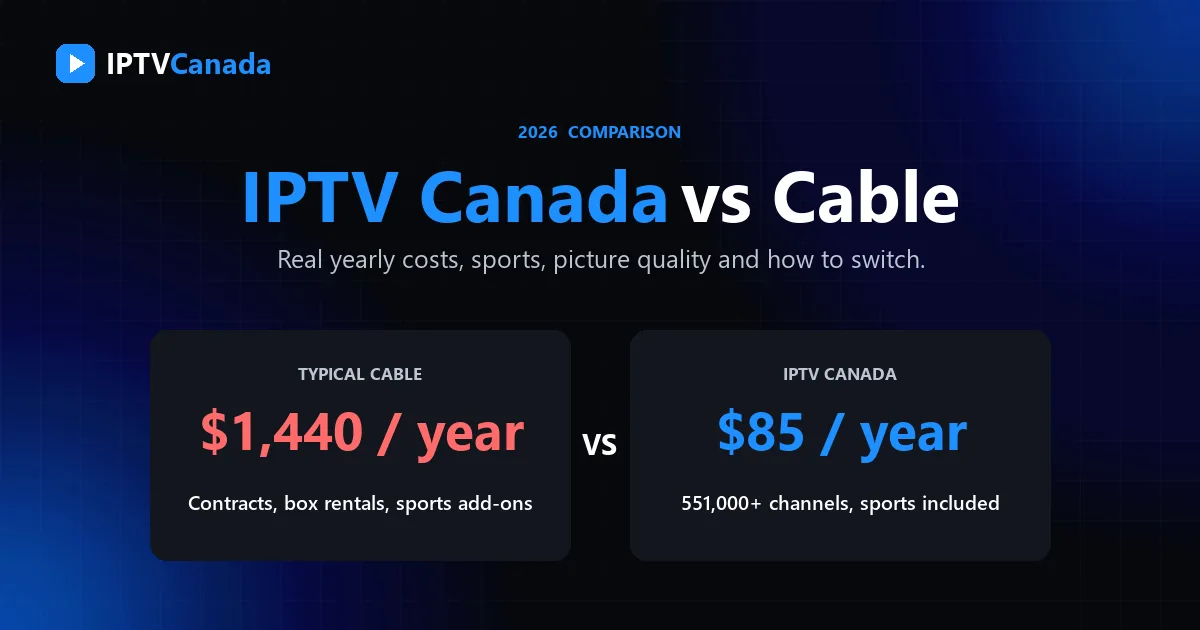
Let’s start with a number most of us would rather not look at: your TV bill. Add the base package, the sports tier, the box rental, the “network access” fee and the taxes, and a lot of Canadian households end up paying somewhere around $120 a month for cable. That’s $1,440 a year — for a service that still misses half the games you actually care about.
That’s exactly why so many people are switching to IPTV Canada. Same living room, same TV, same hockey night, but delivered through the internet connection you already pay for, at a fraction of the cost.
But “it’s cheaper” isn’t a good enough reason on its own. You want to know if the picture is as good, whether it holds up during the Stanley Cup playoffs, what happens to your contract and whether your parents will be able to use the remote. So we sat down and compared the two, honestly, point by point. We also wrote down the exact steps we walk new customers through every week, so you can make the switch without a single blank screen.
Quick disclosure: IPTV Canada is our own service, so yes, we have skin in the game. That’s why every claim below is something you can check yourself with a free 24-hour trial before you spend a dollar.
The Short Answer: Is IPTV Better Than Cable in Canada?
For most households, yes. If you mostly watch live sports, news and a handful of favourite channels, IPTV gives you more channels, more games and more screens for a small slice of what cable costs. Here’s the short version before we dig into the details:
- Cost: a 12-month IPTV plan for one screen costs $85 in total, about $7.08 a month. Cable often costs that much every single week.
- Channels: 551,000+ live channels and 221,000+ movies and series, compared with the few hundred channels a big cable bundle usually includes.
- Sports: NHL, NFL, NBA, MLS, UFC and PPV events are included, not sold as add-ons.
- Contracts: none. You pay for 1, 3, 6 or 12 months and that’s it.
- Equipment: no box rental. A Firestick, a Smart TV app or your phone does the job.
Where does cable still win? If your home internet is slow or unreliable, cable’s dedicated line is more forgiving. We’ll cover exactly how fast your connection needs to be further down, so you can check before you cancel anything.
What You’re Actually Paying For With Cable
The price in the TV ad is never the price on the bill. When we ask new customers to read us their last cable statement, the same line items come up again and again:
- The base package, usually a “starter” or “basic” tier with local channels and a few specialty stations.
- A theme pack or sports tier so you can actually watch TSN, Sportsnet or RDS.
- Box rentals for every TV in the house, often several dollars per box, per month.
- Cloud PVR or recording fees if you want to record anything.
- Taxes and regulatory fees on top of everything.
- A promo price that expires, usually after 12 or 24 months, which quietly bumps the bill up.
None of that buys you more games. Blackouts still apply, out-of-market matchups still need a separate subscription, and the big UFC or boxing night still costs extra as pay-per-view.
And if you want to cancel? Many providers ask for 30 days’ notice, and the promo price you signed up for may come with conditions. If you ever feel a provider isn’t respecting the terms you agreed to, the Commission for Complaints for Telecom-television Services (CCTS) is the free, independent body that handles TV and internet complaints in Canada. It’s worth bookmarking before you call to cancel.
IPTV Canada vs Cable: Side-by-Side Comparison
Here is how the two stack up on the things people ask us about most. Cable figures are typical ranges, since every provider and region is a little different. Our prices come straight from our pricing page and include everything.
| Feature | Typical cable package | IPTV Canada |
|---|---|---|
| Monthly cost | Often $120+ with sports and fees | From $7.08/month on a 12-month plan |
| Live channels | Usually a few hundred | 551,000+ |
| Movies & series | Rentals cost extra | 221,000+ included |
| Sports packages | Paid add-on tiers | NHL, NFL, NBA, MLS, UFC & PPV included |
| Picture quality | HD, limited 4K | SD, HD, FHD and 4K |
| Contract | Often 1–2 years | None (1, 3, 6 or 12 months) |
| Equipment | Rented box per TV | Devices you already own |
| Watch outside the home | Limited app access | Phone, tablet, laptop, anywhere with internet |
| Extra screens | Extra box rental each | Up to 5 devices at once |
| Setup | Technician appointment | About 5 minutes, self-install |
| TV guide | Yes | Yes (EPG) and catch-up on many channels |
The two areas where people expect IPTV to lose are reliability and ease of use. Both come down to your internet connection and the provider you choose, and we’ll tackle each one in its own section.
The Real Savings: Three Canadian Households, Run Through the Numbers
Percentages are abstract. Dollars aren’t. Here are three common situations, based on a cable bill of $120 a month ($1,440 a year). Swap in your own bill and the maths works the same way.
1. The solo sports fan
One person, one big TV, every Leafs, Habs, Oilers or Canucks game, plus Sunday football. A 12-month, one-device IPTV plan costs $85. Compared with cable, that’s $1,355 saved in the first year, and more games on the screen, not fewer.
2. The couple who watch different things
One of you wants the game, the other wants the latest series. With cable, that means a second box and another fee. With a two-device plan, each of you streams on your own screen at the same time for $135 a year, about $11.25 a month. That’s a saving of $1,305 a year.
3. The busy family
Kids’ shows in the playroom, hockey in the basement, the news in the kitchen and a teenager on a tablet. A five-device plan covers all of it for $295 a year, around $24.58 a month for the whole house. Even if your cable bill sat at exactly $120, you’d keep $1,145 in your pocket, and most families with that many screens pay a lot more than that for cable.
Not sure which plan fits? A three-device plan at $195 a year is the sweet spot for most families, and you can always start with a single month at $20 to see how it fits into your routine.
Picture Quality and Reliability: The Honest Truth
This is the part most comparison articles skip, so let’s be straight about it.
Cable has one big advantage: a dedicated line into your home. It doesn’t care how many people in the house are on Zoom or gaming online. IPTV shares your internet connection with everything else, so the quality you get depends on two things: your internet speed and the provider’s servers.
How fast does your internet need to be?
For comparison, Netflix recommends about 15 Mbps for a single Ultra HD stream. For live TV, we suggest giving yourself a little more headroom, because live sports can’t pre-load the way a movie can:
| Quality | Recommended speed per screen |
|---|---|
| SD | 5 Mbps |
| HD (720p) | 10 Mbps |
| Full HD (1080p) | 15 Mbps |
| 4K Ultra HD | 25 Mbps |
Run a speed test on the device you’ll actually watch on, ideally in the evening when your neighbourhood is busiest. Most Canadian fibre and cable internet plans are well above these numbers, even with several people streaming at once.
Why the provider matters just as much
Your internet can be blazing fast and the stream can still freeze if the provider’s servers are overloaded. That’s what happens with cheap, oversold services during big games, when everyone tunes in at the same moment. A good provider invests in premium servers, anti-buffer technology and backup streams on the big events, so if one feed hiccups, another one is ready.
If you’ve had a bad experience before, it was almost certainly one of these three things: a weak Wi-Fi signal, an underpowered device or an overloaded server. Our guide on how to fix IPTV buffering walks you through each one, and most fixes take under five minutes.
Sports: Where IPTV Pulls Ahead of Cable
Ask any Canadian why they keep paying for cable and the answer is usually one word: hockey. Ironically, sports is exactly where IPTV has the biggest edge.
- No add-on tiers. National and regional sports networks are all part of the same lineup, along with US networks and international channels.
- Out-of-market games. Living in Calgary but cheering for the Leafs? Feeds from different regions sit side by side, so you’re not stuck with whatever your local broadcaster picked.
- PPV and live events. UFC cards, boxing and big one-off events are included in the PPV and live event channels instead of costing you $70+ each.
- More than one game at once. With a multi-device plan, the hockey fan and the football fan in your house can both watch live.
We go much deeper on this in our guides to streaming live NHL hockey and watching every NFL game from Canada. If sports are the main reason you’re reading this, start there.
Contracts, Equipment and the Fine Print
Cable is built around keeping you locked in. IPTV is built around letting you leave. That sounds like a strange selling point, but it changes how a provider treats you: if they don’t keep you happy, you simply don’t renew.
No contracts, no rentals
You pay once for the period you choose: 1, 3, 6 or 12 months. There’s no auto-renewal trap and no early cancellation fee. Equipment-wise, you probably already own everything you need. A Smart TV, an Amazon Firestick, an Android box, an Apple TV, a phone or a laptop all work. If you’re shopping for a device anyway, our roundup of the best IPTV boxes for Canada will save you from buying the wrong one.
What about refunds?
Fair question, and you should ask it of any provider. Our refund policy is short: if you run into a technical problem on our side within 7 days of your purchase and our support team can’t fix it within 24 hours, you get your money back. That’s also why we push the free trial so hard. Testing first means you never have to wonder.
Paying safely
We take payment by Interac e-Transfer, the same system you already use to split a restaurant bill with friends. No credit card details are stored on our site, and you don’t sign up for anything that bills you automatically.
Is IPTV Legal in Canada?
This is the question we hear most from people about to switch, so it deserves a clear answer.
IPTV itself is simply a way of sending TV over the internet. It’s completely legal, and major Canadian telecom companies use the same technology to deliver their own TV services. The legal questions are about the content: who holds the rights to it and how it’s distributed, which is covered by Canada’s Copyright Act.
For you as a viewer, the practical advice is simple. Stay away from random “free” streams and sketchy websites full of pop-ups, which are the ones most likely to carry malware or disappear mid-game. Use a provider with a real support team, clear policies and a payment method you trust. The Canadian Centre for Cyber Security has good, plain-language advice on staying safe online, and it applies to streaming apps as much as anything else.
For the full picture, including what Bill C-11 means for streaming, read our guide: Is IPTV legal in Canada? And if you’re wondering whether you need a VPN, we wrote an honest answer to that too.
How to Switch From Cable to IPTV in 7 Steps (Without Missing a Game)
This is the order we recommend to every new customer. The golden rule: never cancel cable until IPTV is running perfectly in your home. Overlap by a few days and you’ll never be left with a blank screen.
- Check your internet speed. Run a test on the TV or device you’ll use, in the evening. Compare it with the table above. If you’re close to the limit, plug the device in with an ethernet cable or move your router closer.
- Choose your device. Most people use the Smart TV they already have or a Firestick. Our step-by-step guides cover Firestick, Samsung and LG Smart TVs and Apple TV.
- Request a free 24-hour trial. Ask for your free IPTV trial on WhatsApp or by email. No credit card needed. Pick a day with a big game so you see how it performs under real pressure.
- Install an IPTV app and sign in. Apps like IPTV Smarters Pro or TiviMate take a few minutes to set up. Enter the login details we send you and the channels load automatically, guide included.
- Test what matters to you. Your local news, your team’s games, the kids’ channels, a 4K movie. Check them all on the screens you’ll really use, at the times you really watch.
- Pick your plan. Once you’re happy, choose the number of screens and the length that suits you on the plans and pricing page. Longer plans bring the monthly cost right down.
- Cancel cable, the smart way. Call your provider, ask for the exact cancellation date and any final charges in writing, and return the rented boxes so you aren’t billed for them. Keep your internet plan, since that’s what IPTV runs on. Some people use the call to negotiate a cheaper internet-only rate.
That’s it. Most of our customers are fully switched over within a week, and the only thing they miss is the bill.
Who Should Stick With Cable (Yes, Really)
IPTV isn’t perfect for everyone, and we’d rather tell you now than have you disappointed later. Cable might still be the better choice if:
- Your internet is slow or unreliable. Some rural areas still struggle to get steady speeds above 10 Mbps. If that’s you, test carefully first, or wait until faster internet reaches your area.
- Your internet has a strict data cap. Streaming in 4K uses a lot of data. Most Canadian home plans are unlimited today, but check yours before you switch.
- You never want to touch an app. Setup takes five minutes, but it does take five minutes. That said, our easy IPTV guide for seniors has helped plenty of people who swore they weren’t “tech people”, and our support team will walk you through it live.
For everyone else, the difference in price is simply too big to ignore.
What to Look For in an IPTV Provider in Canada
Switching to IPTV only pays off if you pick the right provider. Unfortunately, the market has its share of fly-by-night sellers who disappear after a few months. Before you pay anyone, including us, check these boxes:
- A real free trial, long enough to test during a live game.
- Support you can reach before you pay, on WhatsApp or email, with real people answering.
- Realistic prices. “Lifetime” deals for $50 are a red flag. Servers cost money every month.
- A clear refund policy written down on the website, not just promised in a chat.
- Canadian content that actually works: your local news, CBC, CTV, Global, TSN, Sportsnet and the French channels if you need them.
- Multi-device plans so the whole household is covered.
- A direct provider, not a reseller of a reseller. Our guide on direct providers vs resellers explains how to tell the difference.
This checklist is the same one we built our own IPTV service in Canada around, and it’s the fastest way to filter out the services that won’t be around next season.
Coast to Coast: Does It Work Where You Live?
Because IPTV runs over the internet, it works the same way in a Toronto condo, a farmhouse in Saskatchewan or an apartment in Halifax. What changes from region to region is the content people want: French channels in Quebec, the Oilers in Edmonton, the Canucks on the West Coast.
We’ve written dedicated pages for each province, with the local channels and teams people ask about most. Start with IPTV in Ontario, IPTV in Quebec, IPTV in British Columbia or IPTV in Alberta, or read our overview of IPTV across Canada.
Living in a city? Our local guides to IPTV in Toronto and IPTV in Calgary compare it directly with the local cable providers.
Common Mistakes People Make When Switching
When people message us after a rocky first attempt at cord cutting, it’s almost always one of the same handful of mistakes. Avoid these and your switch will be painless:
- Cancelling cable first. Always overlap. Test IPTV for a few days, then cancel.
- Testing on the wrong day. A quiet Tuesday afternoon tells you nothing. Test during a big game or on a Saturday night.
- Relying on weak Wi-Fi. The TV in the basement, three walls away from the router, will struggle. An ethernet cable or a mesh Wi-Fi point fixes it.
- Using an old, slow device. A 2016 Android box with 1 GB of RAM will buffer no matter how good the service is.
- Buying the cheapest service you can find. The few dollars you save disappear the first time the stream dies in overtime.
- Forgetting to return the cable boxes. Unreturned equipment can show up on your final bill. Get a receipt when you drop them off.
Our Verdict: IPTV Canada vs Cable
If you have a decent internet connection and you’re tired of paying more every year for less, IPTV is the better deal for almost every Canadian household. You get more channels, more sports, more screens and no contract, and you keep hundreds of dollars a year that used to go to the cable company.
The only real risk is choosing the wrong provider, and that’s easy to avoid: test before you pay. Request your free 24-hour trial, watch a big game, flip through the channels you care about and see for yourself. If it’s not for you, you’ve lost nothing. If it is, you can choose your plan and be watching in minutes.
Want the full overview of what we offer first? Head to the IPTV Canada home page for the channel list, plans and answers to the most common questions, or read what IPTV is and how it works if you’re brand new to all of this.
Start My Free 24h Trial Compare Plans
Frequently Asked Questions
Is IPTV cheaper than cable in Canada?
Yes, by a wide margin. A 12-month IPTV Canada plan for one screen costs $85 in total, about $7.08 a month, while many cable packages with sports cost $120 or more every month once fees and box rentals are added.
Is IPTV picture quality as good as cable?
With a good provider and a stable connection, yes, and often better. IPTV Canada streams in SD, HD, Full HD and 4K. Aim for about 25 Mbps per screen for 4K and 15 Mbps for Full HD.
Can I keep watching my local Canadian channels?
Yes. The lineup includes Canadian national and regional networks, news and sports channels, plus French-language channels, alongside US and international channels.
Do I need to sign a contract for IPTV?
No. You pay for 1, 3, 6 or 12 months at a time. There is no contract, no auto-renewal and no cancellation fee.
Should I cancel cable before I start IPTV?
No. Start with the free 24-hour trial, then a short plan if you like, and only cancel cable once IPTV is working perfectly on every TV in your home.
What equipment do I need to replace cable with IPTV?
Just your internet connection and a device you probably already own: a Smart TV, Amazon Firestick, Android box, Apple TV, phone, tablet or computer. No box rental and no technician visit.
How many TVs can I use at the same time?
Each connection streams on one device at a time. Multi-device plans cover 2, 3, 4 or 5 screens at once, each with its own login, so the whole household can watch different things.
Is it legal to switch from cable to IPTV in Canada?
IPTV technology is legal and widely used by Canadian telecom companies. What matters is the content source. Avoid random free streams, use a provider with clear policies and real support, and read our guide on IPTV and Canadian law for the details.