Paying over $100 a month to Bell, Rogers or Telus for channels you never watch? You’re not alone. Canadians switch to IPTV subscriptions every month to save money and get thousands of live channels, sports and movies.
If you own an Amazon Firestick, you already have one of the best streaming devices around. Setting it up just takes knowing the right steps.
This guide shows you exactly how to install IPTV in Canada on a Firestick. Whether you’re comparing the best IPTV providers or you just want to watch the game without blackouts, you’ll be up and running in about five minutes.
Why Choose IPTV Over Cable?
Quick reminder of why so many Canadians are searching for IPTV Canada:
- Cost: a typical IPTV subscription costs a fraction of a cable bill.
- Content: Canadian, US, UK and international channels plus sports networks, all in one place.
- Convenience: no rented boxes, no contracts. Just your Firestick and Wi-Fi.
Tip: for HD and 4K, aim for a stable connection of at least 20 Mbps.
Step 1: Allow Apps From Outside the Appstore
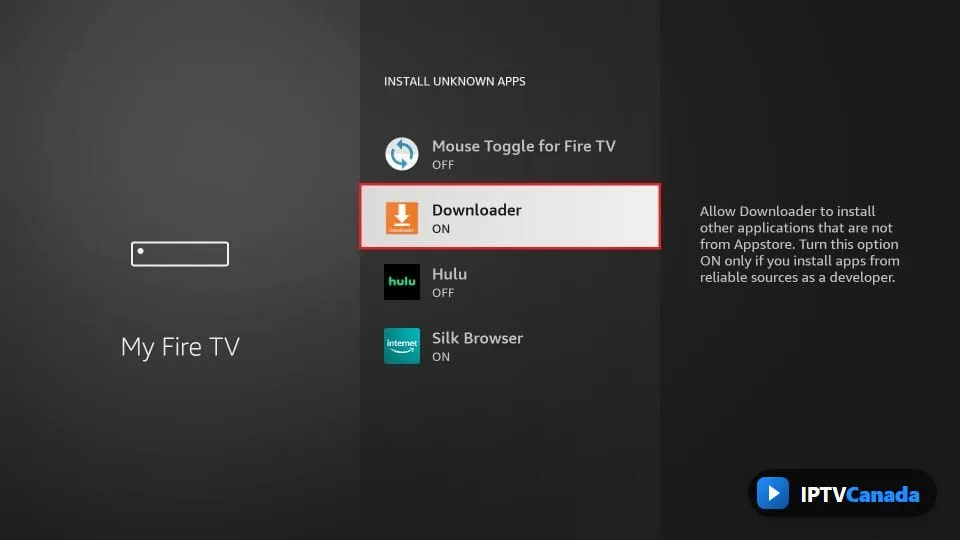
By default, a Firestick only installs apps from the Amazon Appstore. To install an IPTV player, you need to allow apps from other sources. This is a standard setting — it doesn’t void anything or change your device.
- From the home screen, go to Settings (the gear icon).
- Select My Fire TV.
- Don’t see “Developer Options”? Click About, highlight Fire TV Stick and press the centre button on your remote 7 times quickly. You’ll see “You are now a developer.”
- Go back and select Developer Options.
- Turn on Apps from Unknown Sources.
Step 2: Install the Downloader App
IPTV players usually aren’t in the Amazon Appstore, so you’ll use a free helper app called Downloader to fetch them.
- Press Home on your remote.
- Go to Find and search for “Downloader”.
- Select the orange Downloader app.
- Click Download or Get.
- Open it and click Allow when it asks for permission.
Step 3: Install Your IPTV Player
Now for the player itself. Most people use IPTV Smarters Pro.
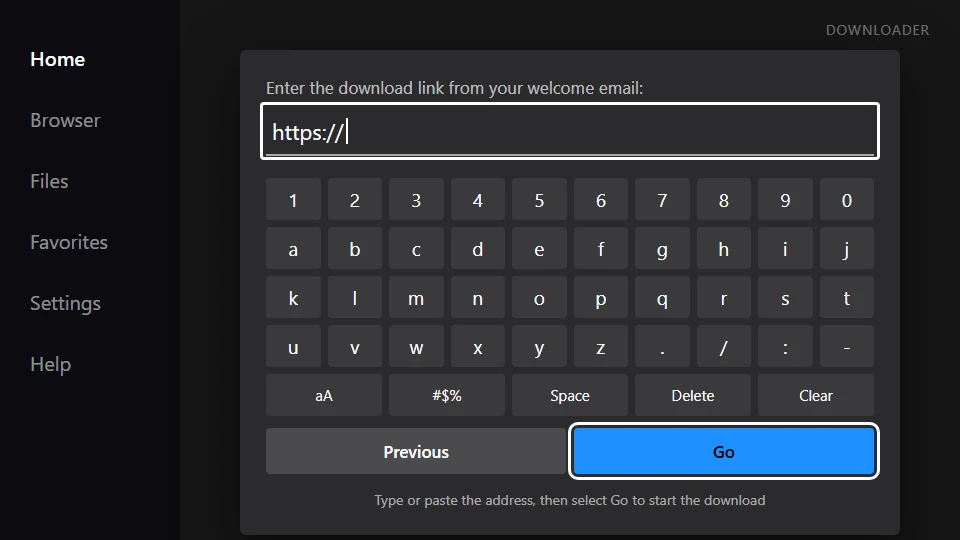
- Open Downloader.
- Click the URL bar where it says
http://. - Enter the download link from the official IPTV Smarters website (or the one in your welcome email).
- Click Go and wait for the download.
- When the window pops up, click Install.
- Click Done (not Open yet).
- Click Delete to remove the installer and free up space.
Step 4: Log In to Your IPTV Subscription
- Go to Apps & Channels and find the app you installed.
- Open it.
- Enter your login details:
- Username
- Password
- Server URL
- You’ll find these in the email you received with your IPTV subscription.
- Click Login or Add User.
No subscription yet? See our IPTV Canada plans and prices for instant access.
Do You Need a VPN for IPTV in Canada?
You might notice buffering during big events like NHL games or UFC fights. Sometimes that’s because your internet provider is slowing down streaming traffic at busy times.
A VPN encrypts your connection, which protects your privacy and can stop that kind of slowdown. It’s optional — read our VPN guide to see if you need one.
Fixing Common Problems
1. The app won’t install. Check your storage. Uninstall old apps and games you don’t use.
2. Channels keep buffering.
- Restart your router or modem.
- Connect the Firestick to the 5 GHz Wi-Fi band, not 2.4 GHz.
- Still slow at peak times? A VPN may help if your provider throttles streaming.
3. “Authorization Failed”. Double-check your username and password — they’re case-sensitive. Still stuck? Our support team is available 24/7.
Ready to Watch?
Setting up IPTV on Firestick is one of the smartest ways to watch TV in 2026: cable-level quality, streaming flexibility and a much smaller bill.
Want the best IPTV in Canada, with 4K quality, anti-freeze servers and 551,000+ channels? Try IPTV Canada today.